 Follow on Substack

Related posts: T15 Telex Connection With ChatGPT AI at Amberley Museum and Telex in the UK and Teleprinters I Remember.
The i-Telex System
A Non-Technical Explanation
Introduction to this post
In my quest to publish a post about i-Telex, I found information about this system fragmented over many web pages, many of which are in German. I also found that many of these pages use technical jargon unfamiliar to me, as a former non-technical telex operator. So I turned to AI and explicitly asked for an explanation of i-Telex accessible to non-technical users. If I have missed anything or if you find errors in this post, I will be pleased to read your comments in the comments section below.
Introduction to i-Telex
If you worked with telex machines in the latter half of the twentieth century, you will remember the distinct environment they created. The mechanical rhythm of the keyboard, the clatter of the printhead, and the distinctive “here is” answerback exchange were the sounds of global business.
By the early 2000s, traditional analogue telex lines and dedicated exchanges had largely been switched off, replaced by the internet, email, and fax. For years, thousands of teleprinters sat silent in museums or private collections, seemingly reduced to static display pieces.
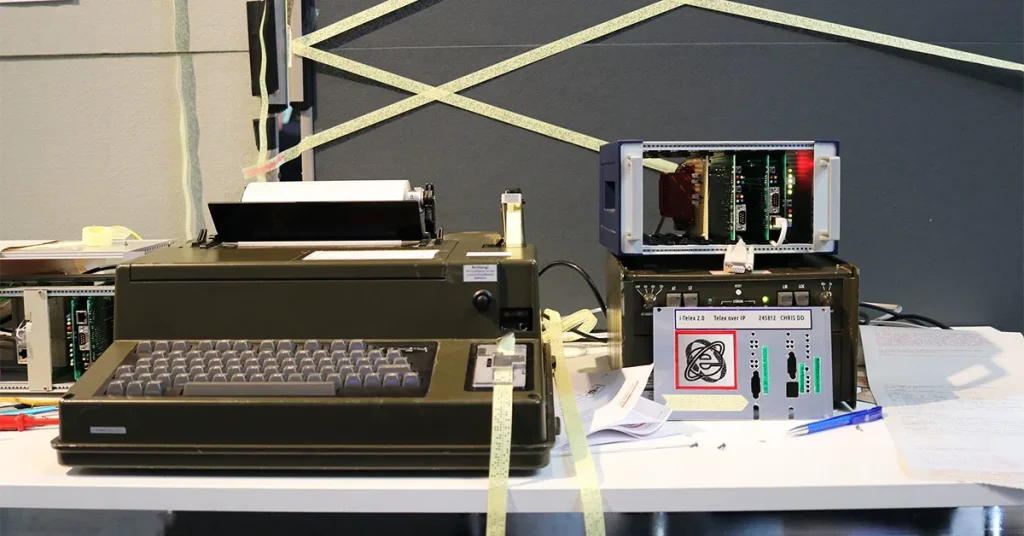
However, a passionate community of hobbyists and engineers, primarily originating in Germany around 2010, refused to let these machines die. Led by developer Fred Sonnenrein and building on earlier concepts, they created a brilliant solution called the i-Telex system.
Today, this system allows vintage teleprinters from around the world to connect and exchange live, printed text messages once again. The clever twist? Instead of using the old, defunct telegraph lines, it sends the messages across the modern internet.
The Problem: Two Different Languages
To understand how i-Telex works, it helps to look at the communication gap it bridges.
A traditional teleprinter doesn’t understand modern internet signals. It communicates using old signalling standards (such as “TW39” for older mechanical machines like the Siemens T100, or “ED1000” for later electronic models). These systems relied on shifting electrical currents or specific audio tones sent down copper wires at a very slow speed—typically 50 baud, or roughly 66 words per minute.
Modern home internet, on the other hand, uses high-speed digital “packets” of data that move over fibre-optic cables or Wi-Fi.
The i-Telex system acts as a real-time translator between these two completely different worlds.
The Hardware: The Electronic Translator
To get an old machine online, a hobbyist installs a small, modular electronic unit next to or inside the teleprinter setup. This unit consists of a small frame (or “backplane”) that holds a few specialised circuit boards:
- The Power Supply Board: This ensures the system has the correct electrical voltages to power both the modern microchips and the heavy-duty, high-voltage requirements of an old mechanical teleprinter.
- The Teleprinter Interface Board: This is the card that physically plugs into your vintage machine. It mimics the old GPO or post office exchange lines perfectly. As far as your vintage Creed or Siemens machine is concerned, it thinks it is still plugged into a 1970s national telex network.
- The Ethernet Board: This card features a standard network socket, allowing the entire unit to plug directly into a modern home internet router with a standard network cable.
The “Global Phone Book” Server
In the old days, if you wanted to call another telex subscriber, the physical exchange handled the routing based on the number you dialled. On the internet, devices find each other using IP addresses (a long string of numbers unique to your home router). Because these internet addresses can change frequently, typing them into a teleprinter would be highly impractical.
To solve this, the i-Telex community maintains a small number of central database servers on the internet. You can think of this as an automated, global telex directory.
When someone joins the i-Telex network, they are assigned a traditional-looking telex number, which is registered on this central server alongside their current internet address.
Step-by-Step: Making a Modern Telex Call
When an operator wants to send a message today, the process feels very familiar:
- Dialling: The operator switches on the machine and dials the recipient’s telex number, either using a traditional rotary dial box or by typing the number directly on the teleprinter keyboard.
- The Lookup: The local i-Telex internet card instantly sends a silent query to the central directory server: “Where on the internet is telex number 12345 right now?” The Connection: The server sends back the correct internet address. The two i-Telex units then connect directly to one another across the internet.
- The Chat: The physical machines roar to life. The classic “answerback” is triggered automatically to confirm the identity of both stations, and the two operators can begin typing to each other in real time.
The central server only acts as the phone directory to establish the call. Once the connection is established, the text data flows directly from one home to another, without any third-party hosting.
Extra Features for the 21st Century
Because the i-Telex interface is powered by modern microcontrollers, the developers have added several clever features that the original networks never had:
- Answering Machines: If you call a machine and the owner isn’t home, the i-Telex card can act as an electronic answering machine, saving the incoming text data and printing it out automatically when the machine is switched on later.
- Email Integration: The system can be configured to allow text-only emails to be routed directly to a teleprinter, causing the machine to wake up and print out an email onto paper tape or page-roll.
- Internal Exchanges: If an enthusiast collects multiple machines, i-Telex allows them to create an internal network within their own home, dialling from one room to another using extension numbers.
Video Demonstration of an i-Telex call
In the associated YouTube video, an operator in Germany demonstrates how a Siemens T1000 teleprinter connects to a remote i-Telex teleprinter terminal.
You can observe the operator dialling a remote telex number by first pressing the left-hand button on the dialling unit located to the left of the teleprinter. This connects the terminal to the i-Telex network. The operator dials the distant teleprinter’s number. On the paper roll, the date and time of the call are automatically printed. Moments later, the answerback (the remote teleprinter’s unique identifier) is automatically printed. The operator then presses the Here Is key (the unique identifier of the sending machine) on the keyboard (not shown). Then the operator presses the switch (to the right-hand side of the keyboard) to initiate transmission of a pre-prepared message on paper tape. This starts the message transmission at approximately 66 words per minute.
The operator could have typed their message live on the keyboard, but using perforated paper tape results in much faster transmission. When the message on paper tape has finished transmitting, the operator presses the Who Are You key on the keyboard (shown) to confirm that the machine is still connected to the distant terminal. Strictly speaking, the operator should have also pressed the Here Is key on the keyboard, which is standard protocol. The operator then presses the Line Feed key several times. This is standard protocol and shows message separation on the printed copy, both on the originating terminal and on the distant terminal. The operator then presses the right-hand button on the dialling unit to terminate the call.
The Global Revival of i-Telex
What started as a niche project in Germany has grown into a vibrant, worldwide network. Hundreds of teleprinters across Europe, North America, and beyond are now permanently turned on, waiting for a call. For former operators, it offers nostalgia; for younger technology enthusiasts, it provides a tactile, mechanical alternative to the silent, screen-dominated modern world.
Thanks to a few clever circuit boards and the internet, the distinct clatter of telegraphy looks set to remain alive for decades to come.
Sources and Further Reading:
- For a comprehensive technical overview and history of the hardware modules, visit the Crypto Museum i-Telex Page.
- To see a detailed breakdown of user setups and configuration software, explore Johannes Kok’s i-Telex Guide.
- The central hub for the worldwide user community is the TelexForum, where enthusiasts coordinate directories and system updates.
Enjoy reading my commentary? Add South Coast View as a Preferred Source on Google to see new posts first.

Subscribe to future posts on this website by email. No spam, just an email when a new post is published. View the posts.
See my explainer titled “What is Substack“.
Posts in Computers and Internet. View all in this subject.

Fix Invisible Text When Copying Blocks in Gutenberg
The Three Tees Agency: The 2026 Reunion

Operation Azalea: The Night Poland Lost Its Telex and Phone Connections

I am head of group at Amberley Connected Earth and the man who was setting up our i-telex has passed away. Do you have a directory of the external links that i-telex can connect to as we are not sure if the paperwork is still available. There is our colleague’s friend who helped him and will be coming to check and show us what to do.
Hi David, I am very sorry to hear of his passing. You can go to the web address https://www.telexforum.de/ From the navigation, select “Members” and from the drop-down box select “Subscriber List” and you will find the i-telex directory. You will notice that Amberley Museum is listed as a subscriber. Hopefully, your colleague’s friend will be able to give you further guidance. Please also see my post at https://www.southcoastview.co.uk/news/t15-telex-connection-with-chatgpt/ where you will find a comment from Sean Williams. He clarified how the connection to ChatGPT was made at Amberly.