

- Force Astra Pro Advanced Headers to match standard page headers
- I contacted Astra technical support
- How the menu appears on posts & pages not using Astra Pro Advanced Headers
- Match Astra Page Header menus with posts & pages that use Advanced Page Headers
- The following CSS solved my problem
- My website setup
- External Links
- Astra Theme Full Tutorial Masterclass
Force Astra Pro Advanced Headers to match standard page headers
Related post: Disable Page Title in Astra Page Header Tutorial – Advanced Headers.
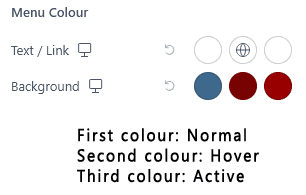
The Problem. Any pages or posts that use the Astra Pro Advanced Header (also known as Astra Page Headers) do not inherit the menu settings set in the customiser. On this website, I have the following customisation set in Customizer > Header > Primary Menu > Design. I have set out my customisation as shown in the associated screenshot.
I contacted Astra technical support
Before contacting Brainstorm Force technical support, I had deactivated my plugins to ensure there was no plugin conflict.
Upon raising this issue with technical support, I received the following response: The behaviour you’re seeing is expected. The options in the customiser apply only to the default header built with the customiser.
I did not initially agree with the above response because I have another website where my posts and pages that use Advanced Headers appear exactly as set in the customiser, without me having to intervene with custom CSS. I did mention this when I raised my support ticket.
Upon further escalation with Brainstorm Force’s technical support, I was pleased to receive a detailed explanation of how the Advanced Headers Module is intended to function. Technical support confirmed that while this module on my other website works (for some mysterious reason) without requiring extra CSS, we both agreed to leave things as they are on both websites, since everything works as I would like.
Applying my custom CSS to resolve this issue is not an arduous task, so I have left it intact for this website.
How the menu appears on posts & pages not using Astra Pro Advanced Headers

Match Astra Page Header menus with posts & pages that use Advanced Page Headers
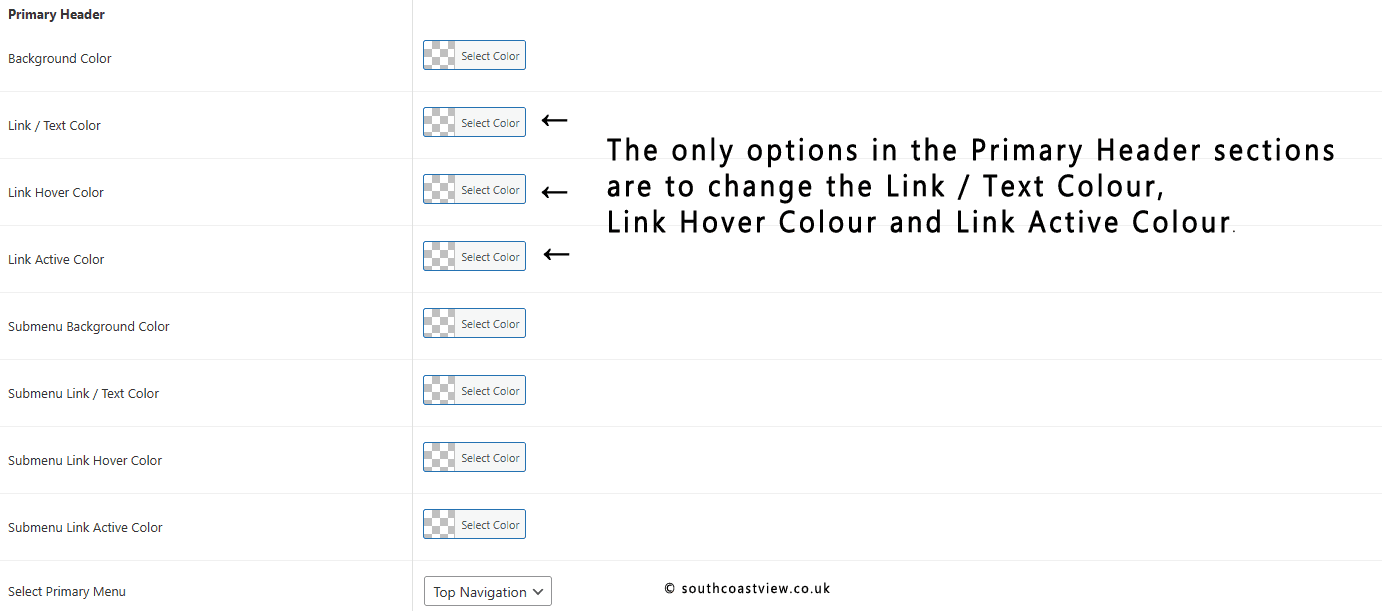
There are no settings in the Astra page header that would enable me to match up the menu colour sections as I would like.
You can click on or touch the associated image to view it in full size.
The Solution. I needed to add some custom CSS to force my advanced headers to match those menus displayed on posts and pages that use advanced page headers. Firstly, I needed to know the correct class for the Astra Pro Advanced Header module. I am merging my page headers with the Above Header section, and in my case, the class is ast-merged-advanced-header.
The following CSS solved my problem
/* Customise above header menu when advanced headers enabled. Active state link background. */

.ast-merged-advanced-header .ast-above-header .main-header-menu > .menu-item.current-menu-item > .menu-link {
  color: fff;
  background: #990000;
  }

/* Customise above header menu when advanced headers enabled. Hover state link background. */

.ast-merged-advanced-header .ast-above-header .main-header-menu > .menu-item:hover > .menu-link {
  color: #fff;
  background: #7A0000 !important;
  }
I could have used this CSS without the class ast-merged-advanced-header. However, by doing so, I would have been duplicating CSS with the customisation I had previously set in the customiser, as mentioned in the problem section above.
The result after applying my CSS is as shown in the Astra Pro Advanced Headers module used at the top of this post.
My website setup
My website uses Astra Pro without a starter template. In other words, the website is built from scratch. I like it that way because it lets me change design aspects, which might be more difficult if I were using one of Astra’s starter templates.
The setup on your website may differ from mine, and this solution may not apply to you.
I am possibly at an intermediate level in WordPress and CSS. Therefore, I do not consider the steps (including the CSS) I have outlined in this post to be necessarily good practice. However, this solution, which involves matching the menus on my Astra Pro Advanced Headers with my posts and pages that don’t use Advanced Headers, works very well for me.
Have you encountered this issue with your Astra Advanced Headers? You may have a better solution. I will be delighted to hear from you in the comments section below.
External Links
Astra Pro Advanced Headers documentation
Astra Theme Full Tutorial Masterclass
The Page Headers section starts at timestamp 2:09:10.

Subscribe to future posts by email. No spam, just an email when a new post is published. View the posts.
Posts in Computers and Internet. View all in this subject.

What is Substack?

Learn Ukrainian Online

I Purchased 8 Striking Pieces of Beautiful Crockery From Javelin Barracks
